SIP trunking isn’t new. It’s been the standard method for transmitting voice over data circuits for years. Originally developed as a protocol for connecting analog desk phones to PBX systems and linking those systems to carriers, SIP trunking enables businesses to make calls over the internet rather than traditional telephone lines and physical analog phone lines.
But what is SIP trunking in today’s context?
This guide explores everything you need to know about SIP trunk service in 2026. Whether you’re evaluating your first VoIP trunk implementation or optimizing your existing infrastructure, you’ll gain practical insights to modernize your business communications.
✨ Key Takeaways
- SIP trunking is a method of delivering voice communications over the internet using the Session Initiation Protocol, replacing traditional phone lines.
- SIP trunking offers businesses geographic flexibility, enabling them to expand their market virtually anywhere without physical infrastructure.
- Successful implementation requires three core components: adequate bandwidth (85 Kbps per concurrent call), a Session Border Controller (SBC) for security and toll fraud prevention, and Quality of Service (QoS) configuration to prioritize voice traffic.
What is SIP Trunking?
SIP trunking is a method of delivering voice and multimedia communications over the Internet using the Session Initiation Protocol (SIP). Instead of using traditional copper telephone lines or physical circuits, a SIP trunk creates a virtual phone line between your business phone system (typically an IP-enabled Private Branch Exchange) and the public switched telephone network (PSTN) or directly to other SIP endpoints.
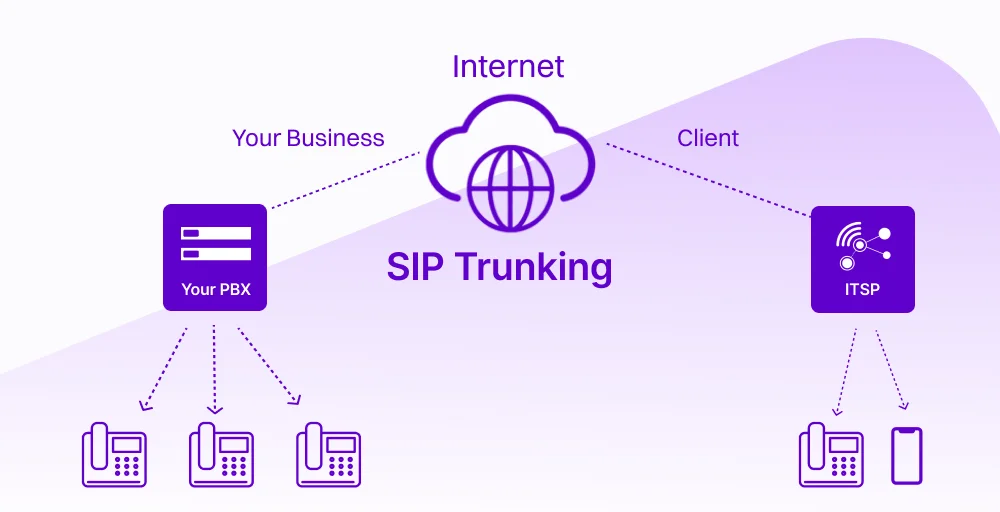
Each SIP line functions as a pathway for call traffic, replacing the need for physical phone lines while maintaining standard telephone functionality. This means you can place outbound calls to any traditional phone number worldwide and receive calls to your business numbers through a single internet connection managed by your SIP service provider
SIP vs RTP: SIP sets up, manages, and ends a call. While RTP actually carries the voice data during the call.
How does a SIP Trunk work?
At its core, SIP trunking establishes a digital connection between an organization’s on-premises phone system and an Internet Telephony Service Provider (ITSP). Instead of routing calls over traditional phone networks, SIP trunking converts voice communications into data packets that are transmitted over IP networks and existing WAN services.
When a call is placed using SIP trunking, the phone system sends a SIP signaling message to initiate the session. Once the connection is established, the voice data is transmitted as packets over the internet to the SIP trunk provider, which then routes the call to its destination.
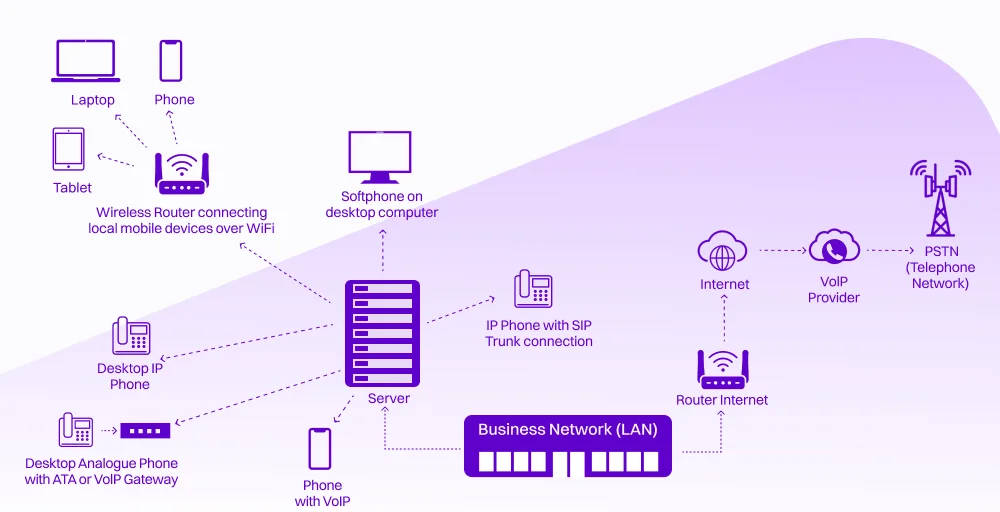
Throughout this process, a Session Border Controller (SBC) operates at the network edge to manage security, ensure protocol interoperability, and maintain call quality, enabling reliable and secure communication.
For capacity planning, it is important to distinguish between a SIP trunk and its channels. A SIP trunk represents the overall connection between the phone system and the service provider (like a highway), while SIP channels represent individual call paths within that trunk (like lanes on the highway). Each channel supports a single concurrent call.
SIP trunking vs. VoIP vs. PRI: Which do you need?
SIP trunking, VoIP, and PRI are related technologies, but they represent fundamentally different approaches to business telephony, and choosing the wrong one can cost you thousands in wasted infrastructure.
VoIP (Voice over Internet Protocol) is the broad umbrella term for any technology that transmits voice calls over the internet. When businesses say VoIP, they typically mean hosted cloud phone systems where providers manage all infrastructure while employees use IP phones or softphones.
SIP trunking is a specific VoIP application that connects your existing IP-enabled PBX to the outside world via internet connectivity. You control your SIP phone system while your business SIP trunk provider handles PSTN connections.
PRI (Primary Rate Interface) uses physical T1 or E1 lines delivering 23 channels (North America) or 30 channels (Europe) per circuit. It’s hardware-dependent, requires professional installation, and operates independently of your internet.
Let’s take a look at side by side comparison:
| Feature | SIP trunking | VoIP (Hosted) | PRI |
| Technology | IP-based; uses SIP protocol over an internet connection | Fully cloud-based IP telephony | Circuit-switched; digital signal over dedicated copper/fiber lines |
| Cost | Pay per channel | Per-user monthly or annual subscriptions | High upfront + expensive scaling |
| Scalability | Add/remove channels instantly via the provider portal | Highly scalable, no physical line limitations | Limited, requires physical installation |
| Flexibility | Works with existing PBX; supports remote/hybrid users via SIP lines | Maximum flexibility; users work from anywhere with internet | Location-dependent; tied to physical office infrastructure |
| Hardware requirements | Existing IP-enabled PBX + Session Border Controller (SBC) | IP phones or softphones; all infrastructure cloud-hosted | PRI-compatible PBX + T1/E1 interface cards + channel banks |
| Typical setup time | 1-5 business days for number porting and provisioning | 24-48 hours for standard deployment | 2-6 weeks for circuit installation and testing |
Ultimately, the choice depends on your current infrastructure and business needs. If you have an existing PBX you want to keep, a business SIP trunk is ideal. If you’re starting fresh or want minimal management overhead, hosted VoIP makes sense.
PRI only remains relevant for organizations with specific compliance requirements or in areas with unreliable internet connectivity. For a deeper dive into the technical and business distinctions, see our complete guide on SIP Trunking vs VoIP.
Why are businesses migrating in 2026?
The shift from traditional telephony to SIP trunking services isn’t just a trend; rather its a strategic decision. Here are 5 benefits of SIP trunking driving business migration in 2026:
Cost efficiency
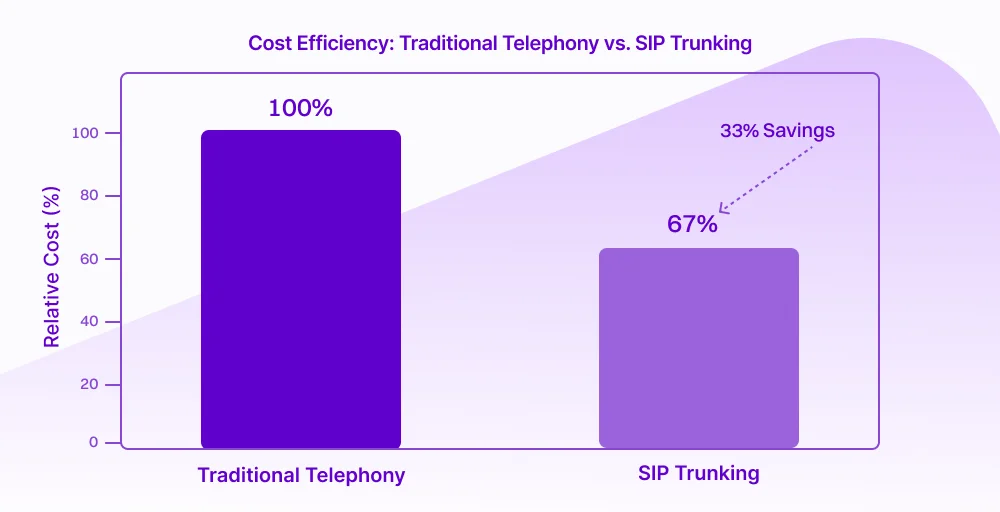
SIP trunking delivers significant cost savings compared to traditional telephony systems by eliminating the need for expensive physical phone lines and reducing long-distance and international call charges. Studies show that the enterprises adopting SIP service report average savings of around 33%.
By leveraging an IP-based network, organizations often reduce hardware maintenance and operational overhead, enabling IT teams to reallocate resources toward strategic digital initiatives rather than phone system upkeep.
Scalability and flexibility
One of the strongest operational advantages of SIP trunking is its unparalleled scalability. Unlike traditional systems that require the physical installation of new lines to support growth, SIP trunks allow businesses to scale capacity instantly by adjusting service plans or adding virtual channels, often in minutes rather than days.
This cloud-centric scalability also supports remote and hybrid work models. Employees can make and receive business calls securely from any internet-connected device without being tied to specific hardware or locations.
Reliability and business continuity
Modern SIP trunk services are designed with built-in redundancy and failover capabilities, significantly enhancing reliability compared to legacy systems. By routing voice traffic over Internet Protocols, businesses can maintain service continuity even during local outages or ISP disruptions.
Additionally, SIP trunking supports advanced business continuity strategies by automatically rerouting calls to alternative sites, mobile devices, or cloud apps in the event of network failure. This level of resilience helps ensure high availability and protects revenue and customer satisfaction by minimizing downtime during critical events.
Enhanced security and call quality
Security is a major consideration in enterprise communications, and modern SIP trunking providers incorporate features such as encryption, Transport Layer Security (TLS), and Session Border Controllers (SBCs) to protect calls from eavesdropping and fraud.
SIP trunking can also improve voice quality by prioritizing real-time traffic, using advanced audio codecs, and employing Quality of Service (QoS) mechanisms. Many businesses report high levels of satisfaction, around 73%, with the audio quality delivered by their SIP providers, reflecting improvements over congested or poorly managed legacy telephony links.
Seamless SaaS and cloud integration
SIP trunking integrates naturally with modern SaaS ecosystems, enabling businesses to unify voice, video, and data communications within cloud-based workflows. This interoperability allows CRM systems, collaboration platforms, contact centers, and analytics tools to share contextual call data, boosting productivity and enhancing customer engagement.
Such unified communications also accelerate digital transformation by enabling real-time workflows and automations. For example, calls can trigger CRM events or analytics dashboards in real-time, providing deeper insights into customer behavior.
Drawbacks and limitations of SIP trunks
While Session Initiation Protocol trunking offers compelling advantages, it’s not without challenges, such as:
Internet dependencies
SIP trunking relies entirely on your internet connection. If your network goes down, so does your office phone system. Unlike traditional phone lines that operate independently, SIP links require stable, high-quality bandwidth. Poor internet performance translates directly to dropped calls, audio quality issues, and communication failures that can damage customer relationships and disrupt business operations.
Solution: Implement redundant internet connections from different providers and deploy a Session Border Controller (SBC) with automatic failover capabilities. Combine this with Quality of Service (Qos) configurations that prioritize voice traffic to ensure consistent call quality even during network disruptions.
Security vulnerabilities
PI-based communications expose your phone system to cybersecurity threats that traditional phone lines never faced. SIP trunking is vulnerable to toll fraud, denial-of-service attacks, eavesdropping, and unauthorized access. Attackers can hijack SIP trunks to place expensive international calls, intercept conversations, or disrupt business operations.
Solution: Deploy a Session Border Controller (SBC) at your network perimeter to act as a firewall for voice traffic. Enable encryption, implement strong authentication protocols, and choose provides that support STIR/SHAKEN compliance for call authentication and offer built-in fraud detection.
Quality of Service (QoS) issues
Voice traffic is extremely sensitive to latency, jitter, and packet loss. When SIP traffic competes with other network traffic, call quality suffers. Even minor degradation causes noticeable problems like garbles audio, awkward delays, dropped syllables, and choppy conversations, which frustrate customers and employees alike.
Solution: Configure network-level Quality of Service (QoS) policies that prioritize voice packets over other data traffic. Use VLAN segmentation to separate voice and data networks, ensuring SIP lines get dedicated bandwidth. Conduct regular network assessments to identify and resolve bottlenecks before they impact call quality.
Bandwidth requirements
Each concurrent call on a SIP trunk consumes approximately 80-100 Kbps of bandwidth (including overhead). For businesses handling high call volumes, these requirements multiples quickly. For example, 20 simultaneous calls require 2 Mbps of dedicated bandwidth for voice. Insufficient bandwidth causes packet loss, latency, and jitter, resulting in a poor caller experience.
Solution: Conduct a bandwidth assessment before deployment and provision internet capacity with 20-30% headroom beyond calculated requirements. Implement dedicated internet circuits for voice traffic or use SD-WAN solutions that intelligently route voice packets through optimal paths, separating critical voice traffic from general data traffic.
Compatibility issues
Not all PBX systems work seamlessly with all SIP trunking services. Codec mismatches, SIP protocol variations, and configuration incompatibilities can cause one-way audio, failed calls, or registration issues. Businesses often underestimate the technical expertise required to properly configure IP-enabled PBX systems, firewalls, and network settings for optimal performance.
Solution: Select SIP trunking providers that offer certified compatibility with your specific PBX model and provide detailed configuration guides or professional setup assistance. Request test accounts before full deployment to validate compatibility, and work with providers offering 24/7 technical support during critical implementation phases.
Is your business ready for SIP?
Migrating to SIP requires more than just signing up with a provider. Your network infrastructure must meet specific technical requirements to ensure reliable, secure, and high-quality voice communications.
Here’s what you need to assess before implementation:
- Bandwidth requirements
Each concurrent call using the G.711 codec consumes approximately 85 Kbps of bandwidth. This means 10 simultaneous calls require roughly 850 Kbps, so ensure your internet connection has 20-30% additional capacity to prevent dropped calls and audio degradation.
- Firewall/SBC
SIP trunking exposes your phone system to internet-based threats, where attackers hijack your system. A Session Border Controller (SBC) acts as a specialized firewall for voice traffic, authenticating calls, encrypting communications, and blocking unauthorized access.
- QoS (Quality of Service)
Voice packets are time-sensitive, which means delays of just 150 milliseconds create noticeable lag. Without QoS policies, your SIP lines compete with other network traffic for bandwidth. Qos configuration prioritizes voice traffic at the router level, ensuring your SIP trunk maintains consistent, low-latency performance even during peak usage.
How to set up a SIP trunk?
Setting up SIP services involves coordinating your internal infrastructure with your provider’s network. While the technical details vary by PBX system and provider, the fundamental process follows these essential steps:
Step 1: Assess your current infrastructure
Verify that your phone system is SIP-compatible. Evaluate your bandwidth to ensure it meets the capacity required for your peak concurrent call volume.
Step 2: Choose a SIP trunking provider
Research and select a business SIP trunk provider that meets your requirements. Request references and test accounts beforehand to validate service quality before committing.
Step 3: Configure network security
Deploy a Session Border Controller (SBC) to protect your SIP trunk from security threats. Implement IP whitelisting to restrict connections only to your provider’s verified IP addresses.
Step 4: Implement Quality of Service(QoS)
Configure your router to prioritize voice traffic over other data using DSCP tagging or traffic shaping policies. Set up separate VLANs for voice and data traffic if your network supports it.
Step 5: Configure your PBX system
Enter your SIP provider’s connection details into your IP-enabled PBS: SIP server address, authentication credentials, codec preferences (typically G.711), and registration settings. Configure dial plans that define how calls route through your SIP trunk.
Step 6: Port your phone number (If needed)
Port your existing business phone number by submitting a Letter of Authorization (LOA) to transfer your existing business number to your new SIP trunking provider.
Step 7: Test and validate
Conduct thorough testing before going live. Make inbound and outbound test calls, verify that the caller ID displays correctly, and test emergency 911 services.
Step 8: Monitor and optimize
After deployment, continuously monitor call quality metrics, bandwidth utilization, and security logs. Address any issues immediately and adjust configurations as your business needs evolve.
Move to a better cloud solution with KrispCall
SIP trunking has evolved from a niche technology into the backbone of modern business communications. As traditional phone infrastructure becomes obsolete in 2026, transitioning from legacy phone systems to modern cloud communications doesn’t have to be overwhelming.
Providers like KrispCall’s modern phone system are designed to reduce costs, scale effortlessly with your business growth, and keep your teams connected. Replace outdated phone lines with a flexible, cloud-based system that handles voice calls, messaging, and collaboration from one centralized platform.
Ready to modernize your business communications? Schedule a demo today and discover how KrispCall can transform the way your team connects with customers and internally.