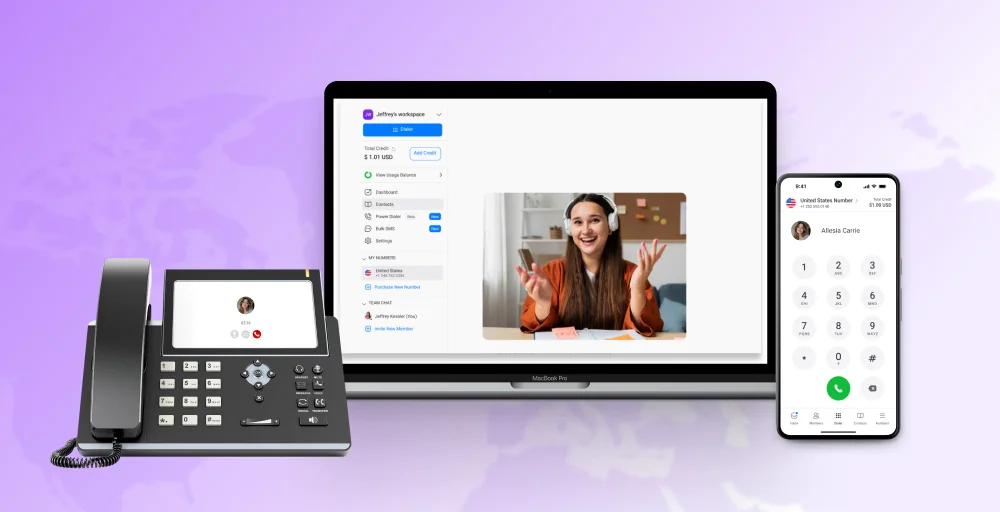
Want to get the most out of your business phone system? Whether you own a small business or run a large corporation, knowing the best VoIP features makes a significant impact on customer communication and teamwork.
From call recording and voicemail to video meetings and integrations, VoIP gives you a full suite of features that will boost your productivity and save you money.
We’ve broken down 30+ key VoIP features into simple terms to help you see what they do and why they matter. If you’re looking to switch or upgrade your current setup, this list makes it easier to make use of the many advantages of VoIP.
✨ Key Takeaways
- Modern VoIP systems offer much more than just voice calls; they also include features like call forwarding, IVR, video conferencing, business SMS, voicemail transcription, and CRM integration.
- Businesses should select VoIP features based on their size, structure, scalability, and communication needs.
- With increasing remote and hybrid work models, VoIP phone system features like mobile apps (softphones), video meetings, voicemail-to-text, and team messaging have become critical.
- KrispCall is a VoIP platform that offers a comprehensive suite of features designed for growth, remote collaboration, and professional customer engagement.
32 Essential VoIP features every business needs
Present-day VoIP telephony solutions have a wide range of functions beyond usual calling. These applications improve communication, reduce expenses, and enhance flexibility.
If you’re a small enterprise or a team manager, the right VoIP phone features can enable you to make improved decisions and boost productivity. Here is an overview of essential VoIP features and benefits that any business should consider.
Core call features
Let’s look at the core call features that make a VoIP phone system work so well for modern businesses. Whether you’re supporting remote teams or handling lots of customer calls, these features help keep communication clear, smooth, and professional.
1. Voice calls (HD quality)
VoIP phone service offers superior HD voice quality compared to traditional landlines. HD calling ensures every call is noise-free and crystal clear, enhancing communication between customers and colleagues.
VoIP phones are reliable on any internet connection, offering professional-sounding calls and consistent voice clarity that enhances your reputation. This feature is valuable for client-facing teams and remote workers who rely on voice clarity in their everyday operations.
2. Caller ID
Caller ID displays the name and number of the caller before answering the call, allowing callers to recognize and prioritize incoming calls. The feature of VoIP assists companies in preventing spam calls, screening unknown numbers, and having professional interactions.
Most VoIP companies allow you to personalize the caller ID when making calls, making your company more recognizable and increasing the likelihood that calls will be answered. It also aids in efficient tracking and logging of calls.
3. Call forwarding
Call forwarding, also known as auto-forwarding, enables you to transfer calls to another number, such as your cell phone or the extension of another team member.
It’s ideal for remote or out-of-hours support, so you never miss a call. You can set up rules on time, presence, or location. This feature makes your VoIP business phone convenient, ensuring that customers can always reach the right person.
4. Call transfer
Call transfer enables users to forward a live call to another department or colleague without disconnecting the caller. It comprises warm transfers (with introduction) and blind transfers (handoff).
This VoIP phone system feature enhances collaboration, facilitates faster resolutions, and improves customer satisfaction by connecting them with the right person quickly and efficiently.
5. Call routing
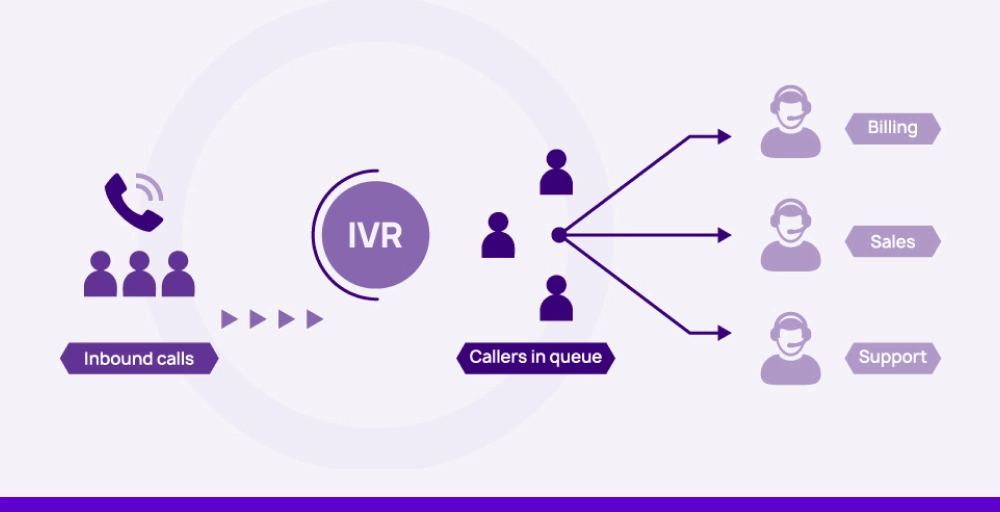
Call routing seamlessly directs incoming calls to the responsible individual or department based on predefined criteria, such as time, geography, or agent availability. It is a required feature for VoIP call centers or multi-department organizations.
It accelerates response times, reduces wait times, and improves caller satisfaction. Intelligent routing ensures that no call gets left on hold or misrouted.
6. Three-way calling
Three-way calling allows you to connect two active calls into one, enabling real-time collaboration of three parties. It’s ideal for quick team huddles, client consultations, or resolving multi-party issues without relying on third-party apps.
It’s a standard VoIP feature that enhances productivity and enables decision-making to happen with ease by allowing all parties to be on the same page during discourse.
7. Conference calling
With conference calling, you can make multi-participant calls, which are fantastic for team report-backs, client meetings, or group discussions. Most VoIP carriers offer built-in features such as screen sharing and scheduling capabilities.
This eliminates the need for third-party app usage, which is both cost-effective and efficient in workflows. It’s ideal for remote and hybrid businesses that need to be present in real-time without requiring employees to be in the same location.
8. Call park
Call park enables you to put a caller on hold and “park” the call in a virtual area where another member of your team can answer it on another phone or device.
It is beneficial for shared office lines or high-volume calls. It’s ideal for VoIP phone systems on reception desks, customer service areas, or busy sales floors where teams need to work more efficiently.
Call management features
Call management features make it easy to handle and direct calls so your customers get to the right person without delay. Here are some important features that keep your business communication running smoothly and professionally.
9. Auto-attendants (Virtual Receptionist)

An auto-attendant or virtual receptionist automatically replies to calls and guides the caller through menu options. It forwards calls to the correct department or person without an operator.
This VoIP feature provides a more professional appearance for your business, increases efficiency, and allows callers to quickly reach the right department or person. It’s a must in any VoIP phone system with multiple calls or departments.
10. IVR (Interactive Voice Response)
IVR enables users to communicate with your VoIP system by entering or providing voice instructions. It can gather data, route calls, or offer self-service. IVR is best suited for companies that want to implement automated customer care or manage high call volumes.
It complements call routing beautifully, forming a clever and intelligent VoIP phone setup that minimizes the requirements of live agents.
11. Call queues
Call queues hold incoming calls during periods of high call volume, playing hold music or custom messages until the next available agent becomes available.
This VoIP telephone functionality is especially useful for VoIP call centers or support groups. It keeps callers engaged instead of hanging up and manages call flow effectively without burdening your employees.
12. Call screening
Call screening allows you to view caller information and choose how to handle the call: answer, ignore, or place it on hold. This is an excellent VoIP feature for busy business people who want greater control over how they use their time.
It blocks unwanted calls and lets you prioritize the significant ones, leading to improved call handling and higher productivity across your business telephony solution.
13. Anonymous call rejection
This feature blocks calls from hidden or unknown numbers, thereby blocking spam, robocalls, or unwanted sales calls. It is one of the lesser-used but highly beneficial VoIP features that enhance security and focus.
With VoIP service providers offering this feature as a standard setting, your IP phone service works better and is less susceptible to interference.
14. Do not disturb (DND)
Do Not Disturb (DND) temporarily blocks all calls from reaching you, sending them instead to voicemail or another destination. It’s perfect for meetings, focus time, or non-working hours.
This VoIP phone system component gives professionals total control over when they take calls, enabling uninterrupted productivity and making it a crucial component in any unified communications as a service implementation.
Messaging and voicemail tools
Here are some handy call management features that help businesses handle calls more smoothly and stay organized, even when things get busy. These tools let you control how calls come in, block unwanted ones, and make sure every caller receives the attention they need without stressing your team.
15. Voicemail
Voicemail is the most vital feature of any VoIP phone system, allowing guests to leave voice messages when you’re unavailable. VoIP voicemail breaks away from traditional systems since it can be accessed from anywhere, by phone, computer, or email.
Businesses can customize greetings, manage messages in one console, and ensure that no inquiry is ever lost. Voicemail keeps your business phone system running smoothly even when you’re not available.
16. Voicemail transcription
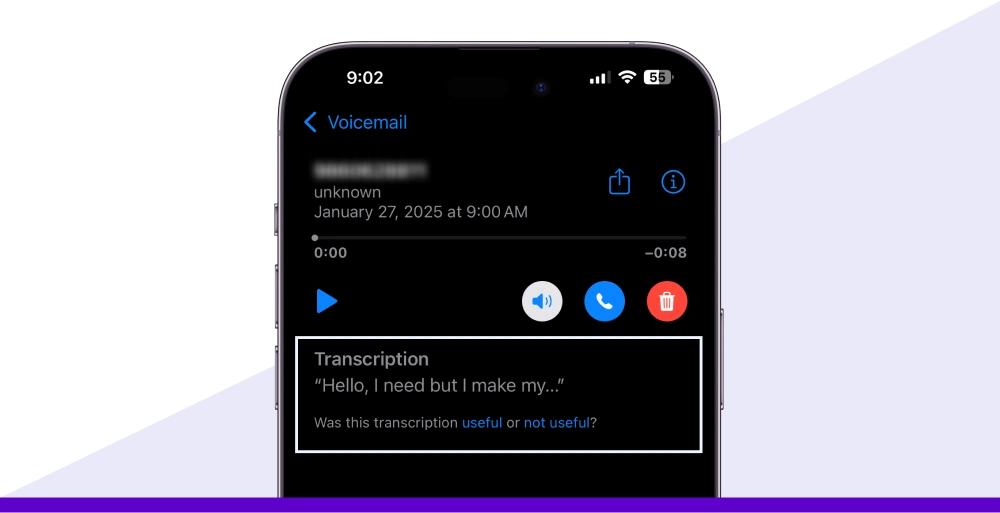
Voicemail transcription is useful in that it transcribes voice messages into text that can be read through email or app notifications. This saves time and allows for the immediate reading of messages, rather than listening.
The voicemail transcription feature of VoIP is useful for busy executives and teams that require quick access to information. Integrating voicemail to email or voicemail to text makes message management faster and more user-friendly.
17. Business text messaging
Business SMS messaging allows companies to send and receive SMS or MMS directly from their VoIP phone system. This is perfect for sending appointment reminders, confirmations, or customer updates.
Since most VoIP providers offer messaging tools as part of their system, it’s easier than ever to have real-time, professional lines of communication open with clients and team members all through one virtual phone service.
18. Instant messaging
Instant messaging is a core part of unified communication, enabling team members to communicate in real-time within the VoIP platform. It reduces email usage and speeds up intranet collaboration.
For coordinating events, giving updates, or asking a quick question, instant messaging is easy to integrate with VoIP phones and is an excellent tool for modern-day unified communications as a service (UCaaS).
Audio and engagement tools
Now, let’s look at a couple of simple but effective audio and engagement tools that make a big difference. They help keep callers entertained while they wait and make it super easy for your team to place calls without any hassle.
19. Custom music on hold
Personalized music on hold allows you to play custom audio, such as music, promotional messages, or announcements, during wait times in a queue. Instead of silence or default tones, your business can provide a branded, informative experience.
This VoIP feature increases customer satisfaction and your business’s reputation. It is beneficial for VoIP call centers and companies that want to entertain and inform callers during hold.
20. Click-to-dial
Click-to-dial enables users to make a call by simply clicking on a phone number from their website, email, or CRM, eliminating the need for dialing. It boosts speed, lowers errors, and is well-suited for sales and support teams.
It can be integrated into VoIP phone service platforms and helps reduce inefficiency in outbound communication. When integrated with business phone systems, click-to-dial enhances workflows and streamlines them, making calls faster and easier.
Collaboration & productivity features
Now let’s look at some powerful collaboration and productivity tools that make teamwork easier and keep everything running smoothly. These features are built right into your VoIP phone system, helping your team stay connected, organized, and efficient whether they’re in the office or working remotely.
21. Video conferencing

Embedded video conferencing lets you start HD meetings directly from your VoIP business phone dashboard, without the need for an extra app.
Screen sharing, chat, and recording are built in at no additional cost, so teams can brainstorm, pitch to clients, or hold webinars all from one app.
Because the feature comes along with your existing VoIP phone subscription, meetings start with a tap and use the duplicate contacts and call logs you’re already managing on a day-to-day basis.
22. Online faxing
Online faxing replaces cumbersome machines with a safe, paperless document exchange. Send and receive faxes as PDFs via email, web portal, or mobile app for a virtual phone service, ideal for contracts, healthcare forms, or legal documents that still require faxing.
Files are retained along with other VoIP phone features (like call recording), giving you one searchable repository for all communications.
23. Team messaging
Unified team messaging gets projects started with real-time discussions, group channels, file sharing, internal message threads, and @mentions all at your fingertips through call controls.
With messages natively integrated into your business phone system, you can automatically escalate a discussion to a voice call or schedule a meeting in seconds. This deep integration of VoIP phones and messaging enables seamless productivity and silences email noise.
24. Mobile app (softphone functionality)
A simple-to-use app turns any smartphone into a full-featured softphone, bringing your office extension, call records, and click-to-dial capabilities on the go.
Make or take calls on Wi‑Fi or data, join meetings, or answer MMS and SMS, all with your business caller ID displayed. For field staff and remote workers, the app keeps communications flowing and professional wherever they go.
25. Admin portals
Web-based admin portals provide one dashboard to monitor users, numbers, call queues, and analytics. With point-and-click controls, you can add extensions, configure auto attendants, or change customizable hold music in seconds, all without needing to request an IT ticket.
Portals provide real-time insights into call volume, quality, and usage, allowing you to optimize your VoIP provider configuration for peak performance and cost savings.
Advanced features for growing businesses
Here’s a quick look at advanced VoIP features that help growing businesses stay efficient and professional. These tools make it easier to manage calls, support teams, and scale without hassle.
26. Call recording
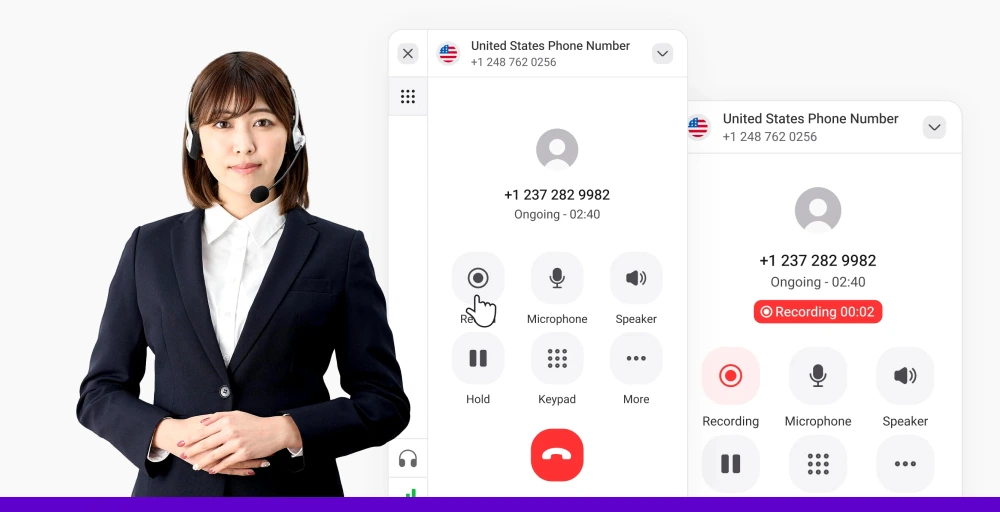
Call recording enables you to record calls automatically or manually, ensuring quality control, training, or meeting legal requirements. It’s a must-have for VoIP call centers, sales teams, and customer support organizations.
The recordings are stored securely and can be accessed from your VoIP phone service control panel. The feature is also useful for reviewing conversations, settling disputes, and refining communication strategies.
27. Call analytics
With call analytics, you can track volume, length, wait time, and agent performance, among other metrics. All this data contributes to informed business decisions, optimized staff scheduling, and an enhanced customer experience.
Analytics dashboards are integrated into most VoIP business phone systems, offering you real-time and historical information about your communications. It is a must-have for scaling teams and data-driven companies.
28. Number porting
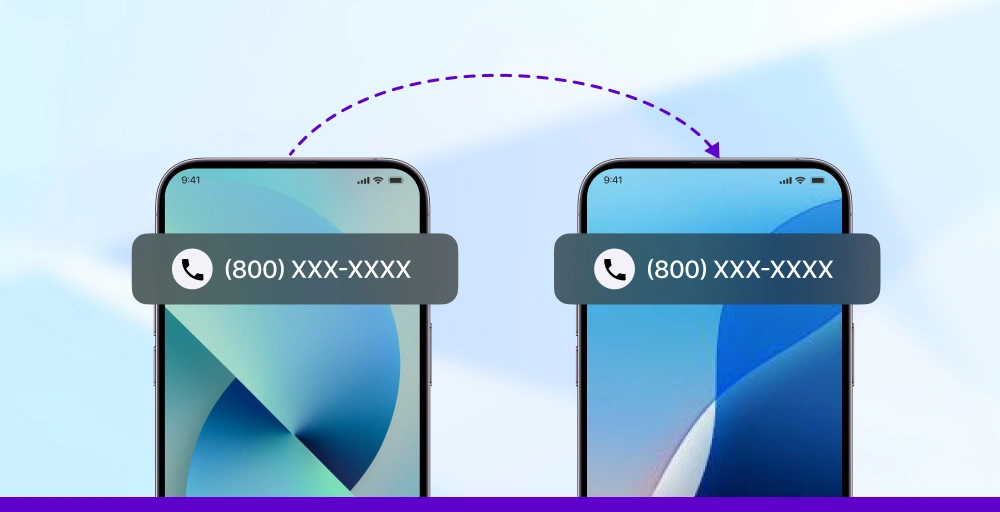
Number porting allows you to retain your original number when switching to a new VoIP service provider. Number porting provides business continuity and helps avoid customer confusion.
When transitioning from a traditional landline or other IP telephone service, porting preserves your brand identity. Most virtual phone service providers offer rapid and convenient number porting with no or minimal downtime.
29. Hot desking
Hot desking allows multiple users to share one VoIP phone device by logging in to their own extension or profile. It is perfect for hybrid teams, shared offices, and rotating shift workers.
Your VoIP phone system becomes flexible and scalable with this feature, and each employee gets access to their own call logs, voicemails, and settings from any desk or location.
30. Unified communications (UCaaS)
Unified communications as a service (UCaaS) integrates voice, video, messaging, and collaboration tools into a single platform. It eliminates the need for multiple tools and streamlines team communications.
UCaaS helps companies save money, enable remote work, and maintain business continuity. A good VoIP provider will deliver UCaaS capabilities that are seamlessly integrated with your existing business phone system.
31. CRM integrations
CRM integrations merge your VoIP phone service with applications like Salesforce, HubSpot, or Zoho. That enables you to click-to-call, log interactions, and view customer data without ever leaving a program.
These integrations streamline workflows, improve customer interactions, and save time. It’s especially beneficial to sales and support teams that rely on rapid access to client information.
32. Business phone number options
With business phone number choices, you can select among local, toll-free, vanity, or international numbers to meet your brand and target audience.
In case you want to establish a local presence or demonstrate a national presence, a reliable VoIP provider should have adaptable number options. These offer the possibility for businesses to grow, reach globally, and appear more professional.
How to choose the right VoIP features
Choosing the best VoIP telephone features makes a significant difference to how effectively your company communicates. You are either a small company or a growing company; the features you select need to align with your goals, organizational structure, and customer needs.
With the multitude of VoIP telephone system options available today, you must focus on what actually adds value to your day-to-day operations. Here is a step-by-step guide to help you choose the most suitable VoIP features and benefits for your business.
1. Determine your business needs
Begin by determining what your company actually requires from a VoIP phone system. Do you receive heavy call volume? Require remote access? Provide customer support?
An example might be that a VoIP call center would find high importance in call queues, call recording, and call analytics, but a small team could require voicemail to email, click-to-dial, and team messaging.
2. Think about team size and structure
Large teams may need features like auto attendants, IVR, and admin portals to support numerous departments. Small teams can stick to essentials like HD voice calls, caller ID, and business text messaging.
The VoIP business phone must grow with your team and offer flexibility like hot desking and mobile apps.
3. Prioritize remote and mobile access
If you have remote or hybrid workers, choose a VoIP provider with a simple-to-use mobile app, softphone integration, and call forwarding.
These enable your staff to remain connected whether they are working at home, at a coffee shop, or in the office. Other features like voicemail to text, instant messaging, and video conferencing are also essential for remote work.
4. Look for integration capabilities
Look for VoIP systems with strong CRM integrations to connect your phone system to applications like Salesforce, HubSpot, or Zoho.
This lets you have features like click-to-dial, automatic call logging, and quick access to customer information all from one interface.
5. Look at customer experience
Personalized hold music, auto-attendant, call screening, and anonymous call blocking are features that help you establish a professional presence and effectively control customer interaction.
These features provide a seamless customer experience and are important to utilize in your virtual telephone system.
6. Choose based on scalability
If you expect growth, select a VoIP phone provider with expandable features of VoIP like UCaaS, call analytics, number porting, and business phone number plans.
These will enable your system to expand as your business grows and adapt to evolving needs.
7. Look for support and reliability
Finally, select a VoIP provider that offers quality customer support, uptime guarantees, and bulletproof service. You require a system that won’t drop calls or lag during peak hours.
Support is especially important when setting up advanced features or resolving issues.
KrispCall: The all-in-one, feature-rich VoIP platform for modern businesses
Say goodbye to clunky phone systems, KrispCall gives your business everything it needs in one sleek, feature-packed VoIP platform. From call recording and voicemail transcription to CRM integration and team messaging, it’s built to keep your team connected and your workflows smooth.
Whether you’re scaling fast or managing a remote team, KrispCall is your flexible, reliable, and affordable phone solution.
Ready to upgrade? Switch to KrispCall, the VoIP system that grows with you.