Every sales call is more than just a conversation; it’s a valuable source of feedback and insights. And, if you do not record sales calls, you’re losing valuable information that can help you close more deals and improve team performance in the near future.
As a sales leader, you’re required to train, coach, and lead your team more effectively by capturing and reviewing sales interactions. But, how do you do it? Most importantly, what are the things you shouldn’t miss out as a sales leader?
Throughout this blog, you’ll understand how to record calls, what methods work best, and how you can utilize sales recordings for higher revenue.
✨ Key Takeaways
- Sales call recording refers to the process of storing conversations between a prospect and a sales representative for future use.
- Some methods for sales call recording involve automatic, on-demand, supervisor-initiated, conference, and video call recording.
- Best practices for recording sales calls include understanding the law, utilizing automatic alerts, explaining the purpose, reviewing the recordings, leveraging AI, and providing customers with a way to opt out of being recorded.
What is sales call recording?
Sales call recording simply means capturing and storing conversations between customers/prospects and sales representatives. After the call ends, sales teams can review what was said on the call, how the customer reacted, and search for key metrics, such as product questions and customer rejections.
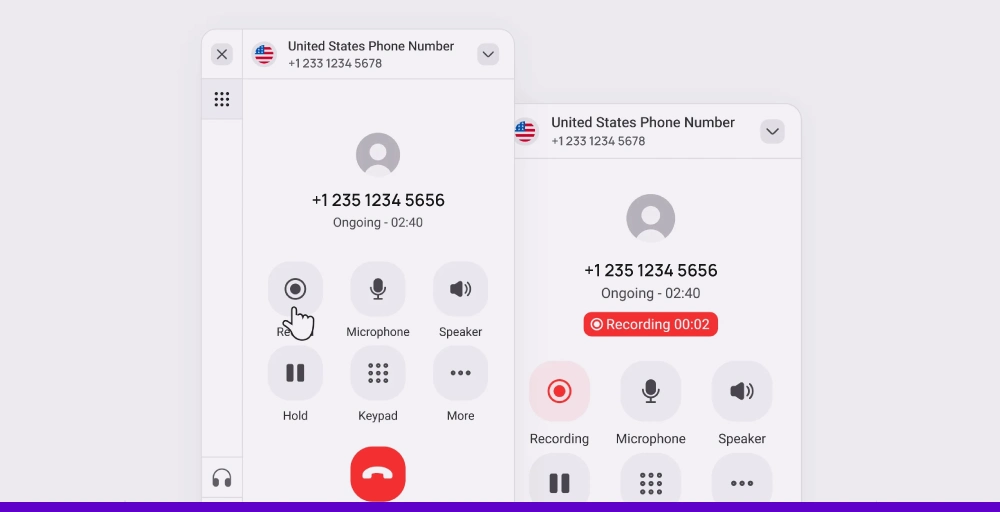
By recording these calls with a sales call recording software, businesses gather valuable insights to improve their sales strategies and tactics.
How to record sales call?
Cloud contact centers offer call-recording features to help sales leaders select the most suitable method for recording sales calls in various scenarios. Some of the effective ways to record call recordings are:
1. Automatic call recording
Automatic call recording automates the manual process of recording sales calls. They record cold calling and follow-up calls, which can be used later to improve call quality. These automated call recordings help call center teams obtain a complete view of the conversation, which in turn helps avoid missing important notes during the sales cycle.
Leaders can utilize these recordings to train onboarding agents and meet compliance requirements in sectors such as healthcare and finance.
Is it challenging to automatically record calls? No, most VoIP phone systems offer call recording software with an option to automate call recordings, and they run quietly in the background.
2. On-demand call recording
What if your team only needs to record certain parts of a sales call? On-demand call recording helps you do that. Sales team members can record the call when the conversation shifts to key discussions.
The “Recording in progress” message is heard after the recording starts and is audible to everyone in the conversation. Some countries have strict federal laws regarding call recording, where you’re required to respect privacy issues and refrain from using automatic call recording.
In those situations, on-demand call recording can be customized to provide prior notice, where callers are informed about the possible recordings before initiating conversations.
3. Supervisor-initiated recording
Supervisor-initiated recording is primarily used by sales managers/supervisor to monitor calls and evaluate the sales team’s performance.
When the recording is on, both customers and agents are unaware of it. Due to this reason, these recordings are also called selective silent recordings, which is an ideal way to determine areas for improvement or areas of strength.
As a result, the supervisor monitors the team’s performance, appreciates salespeople who do well, and addresses questions and concerns to improve the team.
4. Conference call recording
Whenever multiple departments or stakeholders are present on the same call, recording is essential. However, not all call recording systems support multiple users simultaneously. For this, a conference call recording is used.
It captures the conversations and provides recordings of updates and decisions. The proper documentation of strategic discussions can be shared with those who were absent.
5. Video meeting recording
Video recordings are a vital requirement if product demonstrations or visual pitches are part of the sales pitch.
SaaS and technical sales teams rely on this method to understand the customer behavior and sentiments towards the product. These video meeting recordings help to understand what works and what does not, thereby improving the sales process to provide personalized follow-up messages based on customer feedback.
Benefits of recording sales calls
Recording sales calls can help your team close more deals, learn faster about different sales techniques, and save time. Let’s explore how the use of sales call recording can make a real difference.
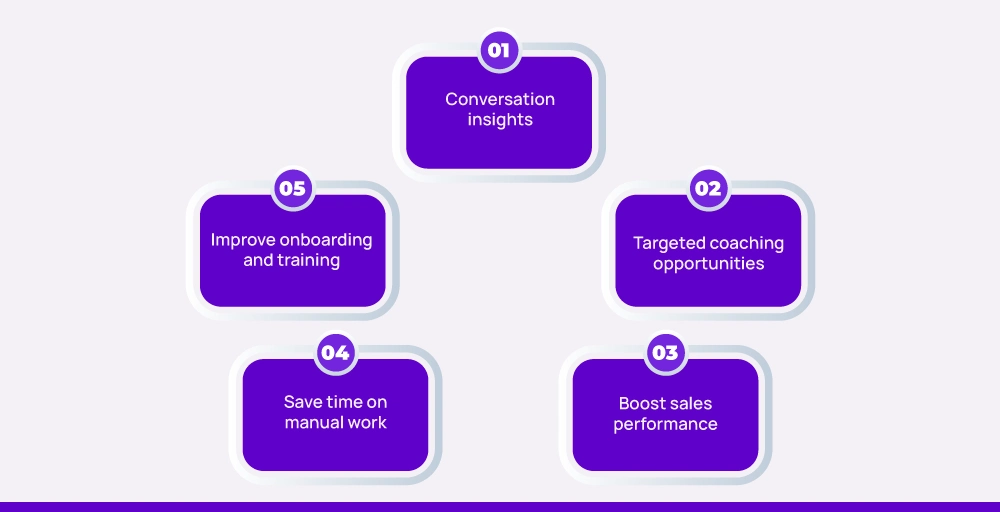
- Conversation insights: The Sales team uses sales calls to review previous calls and understand each prospect’s pain points, preferences, and past objections. With this, they can better prepare for follow-ups and build strong relationships.
- Targeted coaching opportunities: Managers can listen to recordings and give one-on-one feedback to sales reps. They can identify specific areas where new representatives should improve, such as filler words and lost opportunities, and coach them to communicate more effectively and build confidence.
- Boost sales performance: Knowing what works and what doesn’t, coach reps to upgrade their sales pitch and message. They can identify top-performing calls and adopt those methods to deliver better results in other cold calls.
- Save time on manual work: Recording and transcribing software minimizes note-taking. Every data point gets stored, and summary records are easily accessible, which frees your team from hours of manual effort.
- Improve onboarding and training: New agents are able to listen to successful (and unsuccessful) calls to listen to real-life situations in a matter of minutes. It accelerates training and helps them catch up without having to face the consequences on their own.
Sales call recording best practices every team should follow
Sales call recordings are powerful. However, it can also become a burden of unused files, occupying unnecessary CRM storage if you don’t know how to utilize it effectively. Sales call recording rules must be followed to enhance customer interactions, gain a deeper understanding of customers, and effectively onboard your sales team.
Here are the call recording best practices that every sales team should follow:
1. Know the laws before you record
It may be simple to start recording your sales calls, but there are strict data privacy laws in place to protect individuals’ privacy. In some countries or states, at least one party consent is required, meaning that one of the parties should be aware that the call is being recorded.
However, there are countries like Germany, where two-party consent is mandatory for recording calls, meaning you must obtain customer consent before the call begins.
Failure to comply with these regulations might lead to legal problems and negatively impact the brand’s voice and image. Always check your local and international compliance requirements before enabling call recording features on your system, and then only press the record button.
2. Use automatic alerts to save time
Manually announcing that the call is recorded every single time? That’s not so efficient. Enable your contact center software or VoIP system to automatically play a short pre-recorded message at the start of each call.
This saves sales representatives time and ensures you never forget to notify the other party, keeping you in compliance with recording laws, and allowing you to utilize the call recording software fully.
3. Explain why you’re recording
Letting someone know that their call is being recorded is not enough. People want to know the reason, and it should sound valid. Whether it’s for training purposes, service quality control and improvement, or a clearer understanding of agreements, it’s a good idea to specify why.
For example, instead of saying, “This call is being recorded,” you should say, “For quality assurance purposes, this call is being recorded to help us better understand and improve our service.” When your clients understand your why, they are more relaxed and less likely to say no.
4. Maintain sensitive information secure
Often, sales calls involve confidential information, including pricing details, credit card information, and client pain points. Therefore, when recording and storing these calls, sales and marketing teams must have robust data security that safeguards every detail of the conversations.
Choose a tool that comes with encrypted storage in local and in the cloud. Ensure that only authorized personnel have control of the recording files.
5. Don’t just record: review and learn
Once you’ve recorded the important sales calls and followed all the required security protocols, it’s still not enough until you review the recording file and learn from it. Constantly review recorded calls with the sales representatives to analyze what went well and what sales strategy can be implemented to improve it.
Use the real-life examples from actual calls to provide key insight and training materials to agents. And if things are right, you, as a sales leader, can reward agents based on their efficiency and adherence to the call center script, which helps in improving rep performance.
6. Put AI to work for smarter insights
At the current rate of AI evolution, a new AI innovation is coming every other day. As a sales leader, you need to capitalize on this moment to increase your team’s productivity. Utilize artificial intelligence to extract valuable information and actionable insights from recordings automatically.
Additionally, AI can identify keywords, detect tone changes, recognize mentions of competitors, and even comprehend the emotional signals of customers. With this, your entire team spends more time on action, eliminating the manual work of identifying hundreds of call details.
7. Implement the proper way to record for reps
Don’t assume your salespeople understand how to utilize recordings in every possible way. Train them on messaging, tone, and how to handle customers who are unsure or concerned.
And ensure that both your existing and new representatives view recordings as a tool, not a spy camera. When used transparently and with consideration, call recordings can improve performance and confidence without making anyone feel micromanaged.
8. Give customers an option to opt out
Even if it’s legal to record, some customers may still not be comfortable. That’s okay. Your representatives should be trained to offer alternatives, such as note-taking, follow-up summaries, or switching to an unrecorded line.
The goal is to meet their desires without letting the call lose pace, thereby facilitating effective post-call analysis. Having a backup plan shows empathy and professionalism.
What features should you look for in sales call recording software?
When selecting a sales call recording tool, it’s essential to focus on key features that enhance productivity, increase deal closings, and facilitate real-time coaching.
Here’s a quick overview of the top 7 key features you should prioritize:
- CRM Integration: Your call recording tool should integrate seamlessly with your CRM. Through this integration, call data, notes, and recordings get automatically linked to customer profiles, keeping sales teams organized and operating from a single location.
- Automated transcription: Your sales call recording software should be able to transcribe calls automatically. This saves you time and provides you with readable call summaries, giving reps a clear overview of the recording.
- Keyword search: A good recording feature enables you to search call recordings using specific keywords, such as competitor names or product names. This allows representatives to access important conversations without the need to replay the entire call.
- Call tagging and notes: Call tagging and note-taking provide context for subsequent listening. They enable sales leaders to identify trends and reps to listen to customer conversations with a clear overview of what has happened.
- Security and compliance: Sales calls often include sensitive data. Therefore, the software must provide data encryption, access controls, and compliance with standards such as GDPR or HIPAA, depending on your region or industry.
- Call analytics: Look for built-in analytics that provide details on call length, talk-to-listen ratio, and sentiment, among others. These insights help to identify what exactly is best for successful calls.
- Cloud storage and flexibility: Call recording occupies more space than you expected. Having the ability to store sales conversation recordings both in the cloud and locally is important, as it helps you manage space and data retrieval based on your business needs.
Lead your team to success with KrispCall’s call recording
Sales call recording software provides you with a way to improve your team’s effectiveness, which results in closing more deals with better data analysis. If you’re making a cold call or providing a video demo, using call recordings lets you not miss any important detail.
However, to drive the team’s sales performance higher, you must equip yourself with a proper call recording feature that streamlines your sales call workflow. KrispCall’s call recording feature provides valuable insights, automation, and CRM integration to keep your team focused and productive.
KrispCall’s call recording helps you record important sales conversations and gain valuable customer insights. Additionally, you can integrate multiple CRMs with KrispCall to access your recordings in the tool of your choice, making your team more focused and productive.
KrispCall doesn’t limit you to basic call recording. Instead, it provides:
- Record unlimited sales call recordings
- Cloud call storage & organization
- Normal playback and fast-forwarding
- Encrypt recordings and access controls from any device, anywhere
Ready to close deals faster with a solid 24/7 customer support when needed? Give a try to a free demo to understand how call recording operations work in KrispCall.