Ever wonder how modern businesses manage smooth voice and video calls across the internet? It all starts with a powerful technology called Session Initiation Protocol (SIP).
SIP is the technology that makes real-time communication possible through various SIP requests. It initiates, manages, and ends voice and video calls over the internet, whether it’s a telephone call, a video chat, or a conference bridge.
More than just a technical network protocol, SIP is the backbone of modern services like SIP Trunking and VoIP.
Let’s define the SIP protocol, how it works, explore its benefits, examples, and its architecture.
✨ Key Takeaways
- Session Initiation Protocol is a core signaling technology that manages real-time sessions like voice calls, video conferencing, & instant messaging across the Internet.
- SIP works by sending SIP messages between endpoints, initiating a call request, confirming the connection, exchanging media data, and then closing the session when the call ends.
- SIP architecture uses user agents, proxy servers, and registrar servers to manage, authenticate, and route real-time communication between SIP phones and softphones.
What is SIP protocol?
Session Initiation Protocol (SIP) is a signaling protocol used to initiate, manage, and terminate real-time communication sessions over the Internet among different SIP endpoints. These SIP URI sessions can include voice calls, video conferencing, instant messaging, and other multimedia sessions.
SIP forms the foundation of Voice over Internet Protocol (VoIP) and is widely used in modern communication systems to enable seamless, scalable, and flexible connectivity.
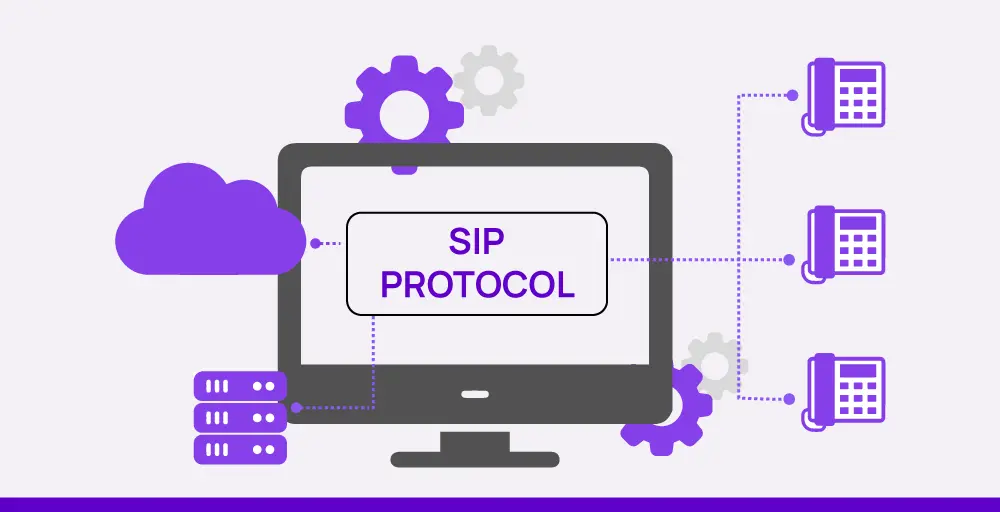
The general breakdown of the SIP protocol is:
- Session: Simply a direct conversation between two people, like a voice call or a video conference.
- Initiation: This is the very first step in a SIP session. It’s about connecting everyone and deciding how they’ll communicate, like what kind of audio or video to use.
- Protocol: A set of rules that regulates how devices talk to each other. SIP specifically outlines the messages exchanged to start, keep going, and end communication.
What is SIP protocol used for?
SIP protocol is mainly used to start, control, and end voice and video calls over the Internet. You can also use it to establish, maintain, and terminate real-time communication sessions like voice calls, video conferences, and instant messaging.
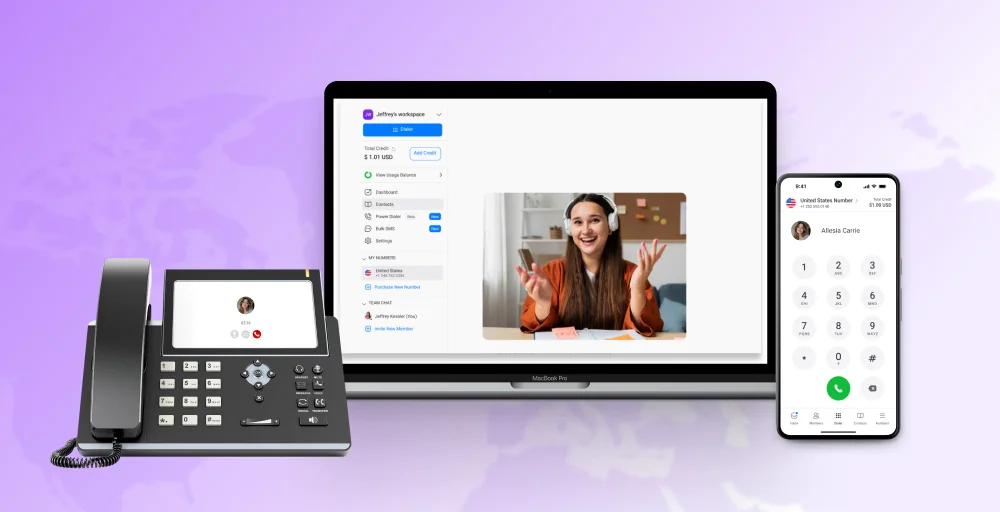
If you’ve ever made a crystal-clear VoIP call, joined a Zoom meeting, or sent a message through a unified communications app, you were likely using SIP without even knowing it. SIP doesn’t require a traditional phone line. All you need is a SIP-compatible device, either a hardware-based IP phone or a softphone app on your mobile phone or computer.
How does the SIP protocol work?
SIP works by establishing and managing your business communication sessions between devices on a network. It enables two-way communication by handling the signaling process required to initiate a session, such as a voice or video call.
When a session is initiated, SIP manages the exchange of information between devices, negotiates essential details like IP ports and supported codecs, and maintains synchronization throughout the call.
Additionally, SIP defines the format of signaling messages and oversees the entire lifecycle of a session, from call setup and routing to active communication and eventual session termination.
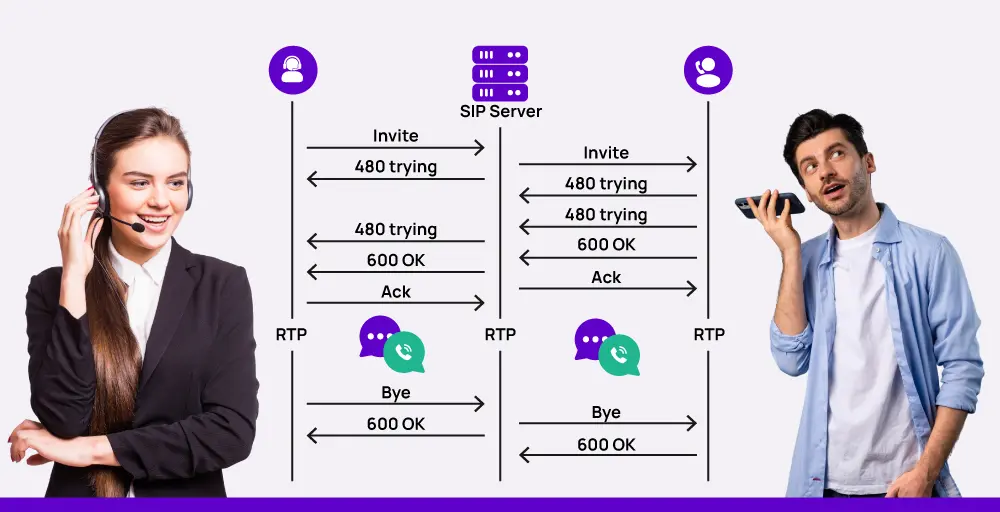
For example, SIP uses specific response codes to indicate the status of a request. 1xx codes signal provisional responses, meaning the request is being processed. 2xx codes confirm that the request was successfully completed. 3xx codes are used for call redirection, while 4xx codes indicate client-side errors, such as failed authentication or invalid requests.
One of the most commonly used responses is 600 OK, which confirms that the request has been handled successfully. SIP messages, whether requests or responses, are typically concise and contain only the essential information needed to manage the session.
To end a call, the initiating device sends a BYE request, and the receiving device acknowledges it with a final response, officially closing the session according to SIP protocol rules.
Overview of SIP protocol architecture
SIP protocol follows a client-server architecture where the User Agent Client (UAC) initiates a session request, like a voice or video call. And, the User Agent Server (UAS) responds from the receiving device.
However, sometimes SIP functions in a peer-to-peer model. In this case, any SIP-enabled device can act as both a SIP client and servers, meaning it can initiate and receive calls.
The SIP architecture comprises five key components, often referred to as SIP protocol layers. Each plays a crucial role in session management:
- User agents: “Endpoints” or user agents are SIP-enabled devices such as IP phones, softphones or mobile apps that initiate or receive communication sessions.
- Network connectivity: SIP uses the Internet connection to send data, so that both your Local Area Network (LAN) and Wide Area Network (WAN) can work.
- Proxy servers: Proxy servers act as go-betweens in SIP calls, directing messages and requests from one device to another.
- Registrar servers: When a device wants to join the SIP network, it sends a REGISTER request. A special server, the registrar, receives this and notes the device’s identity. This information is then shared with ongoing callers, verified, and used to direct calls to the correct location for that device.
- Redirect servers: Redirect servers get requests from registrar servers. They then provide the device’s current location and contact details, and send the request to the right IP address.
Benefits of SIP protocol
Businesses assessing the decision to either replace or upgrade their outdated PBX systems with SIP trunking need to weigh the benefits provided by a sip trunk provider that SIP-based communications bring.
A SIP trunk links business telephony systems to the SIP network, facilitating call routing and delivering superior voice communication via the Internet.
- Cost-effective: As SIP protocols utilize the Internet for communication, they reduce the expenses associated with purchasing a traditional phone system and make communication more affordable.
- Unified communication: All of the multichannel communication, such as voice calls, video chats, and instant messaging, is integrated within one platform.
- Mobility: You can make calls with SIP from anywhere if you have an internet connection.
- Enhance call quality: The SIP protocol often provides clearer call quality, especially with high-definition voice codecs, as it leverages internet bandwidth.
- Interoperability: SIP can easily connect different kinds of devices and services together seamlessly.
Examples of SIP protocol
Here are some examples of the SIP protocol:
- INVITE: The caller’s device sends an invite request to start a communication session.
- 100 Trying: The recipient’s device acknowledges the request and is processing it.
- 180 Ringing: The recipient’s phone is ringing.
- 200 OK: The call is accepted, and media transmission begins using the RTP protocol.
- ACK: The caller confirms receipt of the 200 OK, and the session is established.
- BYE: Either party sends this request to end the call.
Top SIP protocol features
The Session Initiation Protocol (SIP) is a highly versatile and foundational protocol for real-time communication over the Internet. Its widespread adoption is largely due to several key features that enable flexible, robust, and secure interactions.
1. User Availability
SIP keeps track of whether users are online and available in real-time. This allows for features like automatically forwarding calls or sending chat notifications based on their status, making communication easier to manage.
2. Video conferencing
SIP allows for group audio, video, and screen sharing, making it great for high quality voice communication and collaboration in meetings, webinars, and online classes. It also enables real-time video conferencing, which is crucial for online meetings and working together remotely.
3. Media configuration
SIP is used for initiating, managing, and terminating multimedia communication sessions, such as voice and video calls, over IP networks. Working in conjunction with SIP, Session Description Protocol (SDP) negotiates the technical details of these sessions, including audio and video codecs and media formats, to ensure compatible and high-quality communication between diverse devices.
4. Security
SIP uses SRTP (Secure Real-time Transport Protocol) and TLS (Transport Layer Security) to encrypt voice, video, and messages, ensuring end-to-end security. This protects against eavesdropping, tampering, and unauthorized access, making communication secure and reliable.
Common use cases of SIP protocol
The SIP protocol is widely used across various communication technologies; below are some common use cases that demonstrate its versatility in establishing and managing real-time sessions:
A. SIP forking
SIP forking allows a single incoming call to ring multiple devices simultaneously. For example, when someone calls your SIP number, the call can be sent to your desk phone, softphone app, laptop, or mobile device all at once.
B. SIP paging
SIP paging functions like a modern, internet-connected loudspeaker system. It allows you to broadcast live or pre-recorded voice messages to multiple SIP-enabled devices simultaneously over your IP network.
C. Voice over Internet Protocol (VoIP)
VoIP lets you make phone calls using the internet. SIP is the set of rules that makes these internet calls work, using specific “doors” (ports 5060 and 5061 for secure calls). Your internet telephony or app connects to a central SIP server to get connected.
D. SIP trunking
SIP trunking is a modern way for businesses to handle SIP phone calls. Instead of using old-fashioned phone lines or softphones, it lets you make and receive calls over your existing internet connection. Additionally, it maintains compatibility with the Public Switched Telephone Network (PSTN), allowing you to call anyone, anywhere.
E. Unified Communications
Unified Communications (UC) merges instant messaging, video conferencing, and phone calls using SIP.
SIP enables these services to work together on call center software platforms that manage sessions over the internet, boosting collaboration. Common UC features like desktop sharing and integrated messaging run on SIP, typically using port 5060.
SIP and VoIP: What’s the difference?
Voice over Internet Protocol (VoIP) is a technology that allows devices to make and receive calls using an internet connection. In contrast, SIP (Session Initiation Protocol) is a specific communication protocol within the VoIP ecosystem.
While VoIP is the general capability of making calls over the internet, SIP is the set of rules that establishes, manages, and terminates these multimedia communication sessions.
Essentially, VoIP is the “what” (making calls over the internet), and SIP is a key part of the “how” (the signaling protocol that sets up and controls those calls), working alongside other protocols like RTP for media transmission and SDP for session description.
| SIP | VoIP |
| It sends all types of media stream sessions, voice, video, and text messages. | VoIP sends only voice and messages. |
| This is independent of other devices; only a Modem is needed. | Must have an IP phone and IP software. |
| To handle large amounts of data, it uses a peer-to-peer model. | VoIP systems manage, arrange, and route communication through a single central network. |
| Supports user mobility across devices and locations. | Device or network-dependent. |
| Offers advanced call control features (e.g., call transfer, call forwarding, hold). | Provides basic call functionality. |
Conclusion
Whether it’s voice, video, or messaging, SIP enables seamless real-time interaction across any device and its location services. It’s not just about making calls; it’s about unlocking flexibility, scalability, SIP features, and better control over your communications infrastructure.
If you’re looking for a reliable, feature-rich SIP trunking or VoIP solution, KrispCall is an excellent choice. With advanced call management features, enterprise-grade reliability, and global accessibility, KrispCall empowers businesses to communicate smarter and scale faster, without the complexity.