Most organizations rely on VoIP for phone calls, and the frustration of poor call quality, jitter, and latency in VoIP is an all-too-common pain point. That said, having distorted audio, echoes, and dropped calls can lead to customer abandonment.
The solution to these issues is VoIP QoS, which prioritizes network traffic to ensure high-quality voice calls and avoid audible errors, improving VoIP call reliability.
In this blog, we’ll cover the definition of VoIP QoS, its benefits, and best practices to implement.
✨ Key Takeaways
- VoIP QoS acts as a network traffic manager, preventing issues like latency, jitter, and packet loss in VoIP calls by giving voice data top priority.
- QoS is adjusted by changing router settings to prioritize VoIP traffic, such as marking calls with “highest priority” or the DSCP value EF(46).
- QoS prevents dropped calls, reduces echoes and robotic-sounding audio, and audible errors, and ensures consistent call quality.
What is VoIP QoS?
VoIP QoS is a technology that is used to prioritize network traffic to ensure high-quality VoIP voice calls. It ensures that data packets for voice calls reach their destination IP address in the correct order and on time, reducing latency and jitter.

Voice over internet protocol (VoIP) QoS eliminates local network congestion by managing voice and video applications separately from other traffic. Using techniques like expedited forwarding gives voice data priority, ensuring clear calls without one-way audio issues or dropped connections.
Why is VoIP QoS important?
With a strategic approach, businesses can get numerous benefits from the VoIP quality of service that can impact overall organizational work efficiency. The advantages of good VoIP QoS go beyond just fixing simple call issues. And it can help in several other ways:
- Prevents dropped calls and connection instability: VoIP QoS ensures that all your voice data is transmitted in a consistent path across the network. Having it eliminates the potential for disconnectivity or calls cutting out.
- Reduces latency and echo in conversations: VoIP QoS allows a two-way conversation flow naturally. It minimizes the total travelling time of voice data packets and reduces the delays that cause awkward silence.
- Minimizes jitter for smoother voice transmission: QoS of VoIP reduces network jitter, which is a variation in voice data packet arrival times. This technology uses intelligent buffering to rearrange data packets, eliminating the robotic sounds and choppy nature that makes the call unintelligible.
- Improves agent productivity and customer satisfaction: Smooth business communication creates happiness for both agents and customers. A reliable VoIP call management system ensures agents stay focused on communication instead of technical issues, fostering customer satisfaction.
- Ensures consistent call quality during peak hours: SIP traffic and voice data packet prioritization are always a top priority as part of quality of service in VoIP. Even during the busiest traffic, QoS systems prevent other bandwidth-heavy activities from compromising call clarity.
- Helps with cost control: VoIP QoS helps avoid excessive VoIP costs. This system proactively manages the internet connection speed and traffic, avoiding the requirements of costly bandwidth and upgrades. Moreover, you can spend less time troubleshooting VoIP and resolving connection issues, resulting in minimal requirements for IT Teams.
What are the recommended VoIP QoS settings?
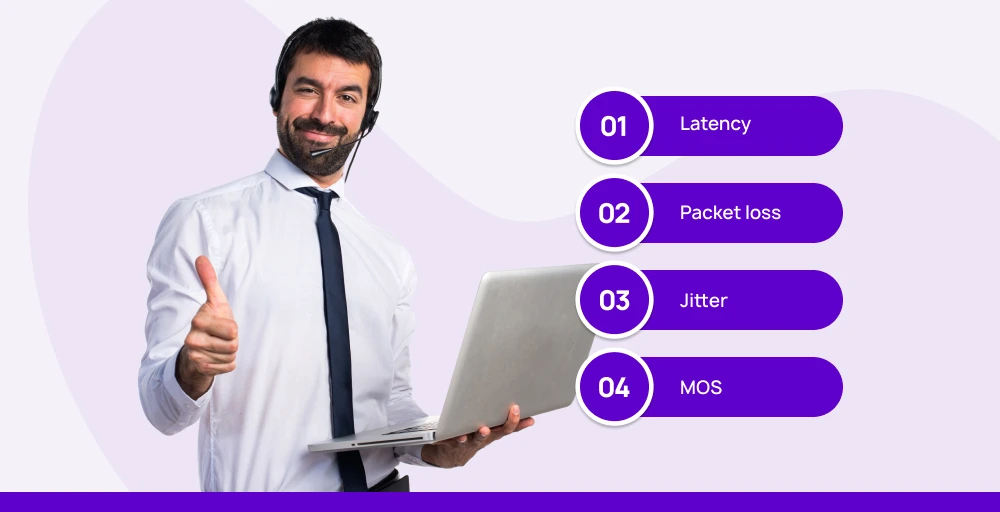
Adjusting VoIP Quality of Service (QoS) settings usually means being familiar with common network benchmarks. In any case, here is a general guideline:
I. Latency
When you make an internet call, there is always going to be some delay between when the person speaks and when their voice reaches the receiver. This delay is called latency. The acceptable latency for calls is usually between 100 and 150 milliseconds.
II. Packet loss
When you make a phone call over the internet, the voice data has to be sent in chunks. These chunks are called VoIP voice packets. To send the packets across the net, the data first has to be broken apart into little pieces that can be easily read and sorted by routers and servers.
But sometimes, during transmission, a few packets go missing. This is called packet loss. If packet loss exceeds 3%, the audio quality will be significantly reduced.
III. Jitter
A jitter is the amount of time it takes for packets of information to travel from the sender to the receiver during an online phone call. The packets are meant to arrive at steady, consistent intervals and in the correct order. However, sometimes, things can cause the timing to become uneven.
IV. MOS
The last thing we look at is called the MOS score. MOS stands for Mean Opinion Score. Basically, after people make phone calls using the internet service, they get asked to rate their experience on a scale of 1 to 5. Firstly, 1 means really bad quality, and 5 means the call is of excellent quality.
How can you adjust VoIP Quality of Service Settings?
If you want the best configuration, you have to go beyond just enabling the VoIP QoS router settings to achieve an optimal VoIP call optimization.
By following these best practices for adjusting VoIP Quality of Service settings, businesses can ensure their telecommunication is smooth, clear, and reliable.
1. Identify your network and its configuration
The first thing you need to understand is how your specific network configuration works. Most of the routers and switches have unique settings.
You can check their official documentation for guidance on the tools and equipment. Knowing these helps in implementing an effective configuration.
2. Prioritize VoIP traffic by type, not by device
Rather than prioritizing the particular phone or network devices, you should give priority to traffic. You can use VoIP traffic setting techniques like differentiated services code point (DSCP) to mark voice packets with EF (Expedited Forwarding).
This marking empowers the switch and router to handle a specific type of traffic with the highest priority, irrespective of the devices.
3. Using wired connections for VoIP devices
Wi-Fi does offer flexibility. However, sometimes they drop the signals or interference, resulting in inconsistent performance.
For high voice quality and consistency, use a wired Ethernet to connect VoIP devices like computers, desk phones, or run softphones similar to PSTN. This connection provides a low-latency, stable connection and avoids the risk of a bad call.
4. Use strategic bandwidth management
Effective network management is more critical than bandwidth. Use a strategic approach, such as limiting bandwidth-heavy activities during peak hours, to ensure the voice traffic has sufficient bandwidth.
You should prioritize critical applications and implement QoS policies to prevent congestion and improve VoIP network bandwidth management.
Top QoS monitoring software
A robust quality of service (QoS) monitoring software is essential for ensuring optimal network performance, especially for critical applications that depend on consistent bandwidth, low latency, and minimal packet loss.
These tools help IT teams monitor, analyze, and troubleshoot network traffic to maintain high service quality and user satisfaction.
Here are the top QoS monitoring tools:
- Auvik: Auvik is a cloud-based network monitoring system designed for automated discovery and continuous network mapping. It excels in remote system monitoring across multiple sites, provides traffic analysis, and offers proactive alerts to prevent system issues before they escalate.
- Datadog: Datadog offers full-stack observability with strong correlation across network and application metrics. It provides comprehensive real-time monitoring, making it easier to diagnose and fix performance bottlenecks, including QoS-related problems.
- ExtraHop RevealX: ExtraHop RevealX delivers real-time wire data analytics powered by machine learning. It offers deep insights into network traffic flows and can analyze QoS parameters to uncover hidden performance issues, enhancing proactive network management.
- SolarWinds NetFlow Traffic Analyzer: This tool focuses on Cisco environments, integrating NBAR2 for detailed traffic classification. It monitors QoS metrics such as packet loss, latency, and jitter, providing detailed WAN performance visibility and VoIP call quality analysis.
- Site24x7: Site24x7 leverages AI for global network monitoring and QoS tracking. It offers customizable dashboards and preconfigured sensors that make it easy to monitor key QoS parameters across on-premises and cloud environments, aiding in quick issue detection.
These popular QoS monitoring tools offer a variety of advanced features and capabilities, and administrators effectively tackle QoS challenges in diverse network setups.
Key challenges of Voice over Internet Protocol QoS
VoIP QoS is an excellent tool that can benefit a company in many ways. However, it also has its limitations. Let’s look at some of its limitations.
- Varied network environments: Balancing QoS for VoIP can be tough in varied network setups. While organizations have control over their Local Area Network (LAN), the broader Wide Area Network (WAN) is usually out of their hands. This makes it tricky to ensure consistent QoS across the entire network, posing challenges for reliability.,
- Other device usage matters too: Even with QoS, devices downloading or streaming videos on the same internet connection might slow down calls. Uploading big files or watching videos takes up bandwidth, which is needed for calls.
- Old equipment limits QoS: Really old routers or switches might not support the latest QoS features well. Calls may still have problems on IP networks with very outdated Internet gear that QoS can’t fully use.
- Internet dependency: No matter what you do, your internet provider ultimately controls your connection quality. During peak hours, when the whole network gets crowded, not even QoS can fix issues caused by an overloaded provider network. QoS works best when other networks, like your provider’s, have lots of spare bandwidth.
KrispCall: Advanced VoIP Quality of Service Provider

QoS is critical in a VoIP network to improve support and the user experience. This means choosing reliable VoIP service providers with strong infrastructure and networking. One top option is KrispCall. Not only does it offer virtual phone service capabilities, but it also provides things like great uptime guarantees and a worldwide network.
In addition, KrispCall offers advanced features such as automatic call distribution, number porting, global calling, and many more. These advanced features enhance telecommunication and streamline call management for both businesses and individuals.
Conclusion
For clear and consistent communication, implementing VoIP QoS is a must. This technology allows organizations to remove call issues with effective network management. VoIP QoS works as a traffic controller of your network, ensuring every phone call is treated as a priority, reducing packet loss, jitter, and latency in VoIP.
Moreover, by implementing the right QoS approach, businesses can proactively monitor and test the call quality performance to deliver an exceptional customer experience. With QoS, companies can build reliable business VoIP connectivity, boost internal operations, and lay the groundwork for high-performance communication.