Switching to VoIP may seem complicated, but it’s actually much simpler than most people think, and the advantages are definitely worth it.
From saving money on your monthly phone calls bill to giving you the freedom to make and receive calls from anywhere with an internet connection, VoIP changes the way you communicate. So, whether you are a small business owner, a remote worker, or just want to modernize your home telephone, setting up VoIP is reasonably quick and easy.
This guide will walk you through the simple steps of setting up VoIP, allowing you to experience clearer calls and a more flexible way to communicate.
✨ Key Takeaways
- VoIP offers more flexibility and reduced costs by allowing you to make calls via the internet rather than traditional phone system.
- Setting up VoIP is straightforward; just select a provider, connect your device and configure your router.
- VoIP phone system offers affordable communication, remote working flexibility, and advanced features like voicemail, call forwarding, and call recording.
What is VoIP, and how does it work?
VoIP (Voice over Internet Protocol) is a modern communication technology that enables you to make and receive calls over the internet, rather than using traditional landline (PSTN) services.
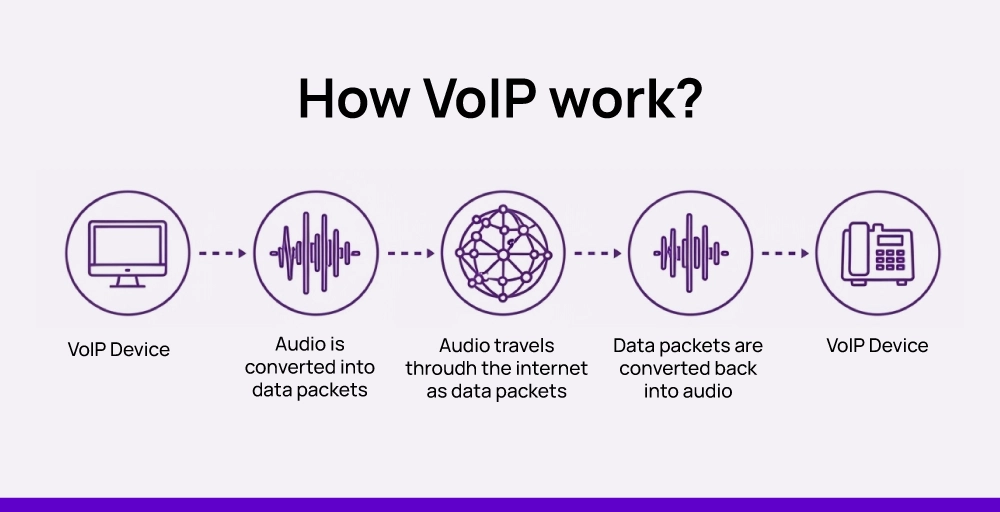
VoIP converts your voice into digital data, sends it over your internet connection, and reassembles it on the other end in real time. It doesn’t matter what you’re using, whether it’s a SIP phone, softphone, or a complete VoIP phone system; the whole process is fast, efficient, and cost-effective.
See How It Works 👉: A Complete Guide to Voice Over IP
3 key benefits of using VoIP:
- Cost-efficient communication: VoIP significantly reduces calling costs, particularly for long-distance or international calls. Additionally, you don’t need to pay for installation fees for extra phones.
- Easy installation & flexibility: The installation of a VoIP phone calls system is quick and easy; simply plug in your SIP phones or softphones, set up the configuration, and you’re done. Additionally, you can work from anywhere with a stable internet connection using a VoIP system.
- Advanced features: With VoIP, you can access advanced features such as call recording, auto attendant, voicemail greetings, call forwarding, routing calls, IVR, and video conferencing.
Essential equipment for VoIP installation
Whether you’re planning a home VoIP setup or a complete business traditional phone system, here is the essential equipment you’ll need for a proper VoIP installation.
1. High-speed internet connection
A stable and fast internet connection is the foundation of any VoIP setup. Since VoIP relies on the internet to transmit voice data, your connection must support smooth audio with minimal network jitter or lag.
For each VoIP (Voice over Internet Protocol) call, approximately 85 to 100 kbps of bandwidth is required per concurrent call to ensure clear and reliable audio quality.
Run a speed test to ensure you have enough bandwidth for multiple simultaneous calls.
2. Reliable VoIP service provider
Select and subscribe to a reputable VoIP phone service that offers high-quality calls, robust security features, and essential VoIP solution, including call forwarding, IVR, call recording, voicemail greetings, and video conferencing capabilities.
Leading providers also support number porting, vanity numbers, and unified communications, helping you streamline business communication across devices and channels.
3. VoIP-compatible device (IP phone, softphone app, or VoIP headset)
To use VoIP effectively, you’ll need a compatible device. This can include an IP phone (a desk phone designed for VoIP), a softphone (an app on your smartphone or computer), or a VoIP headset for hands-free communication.
Softphones are ideal for remote teams, while IP phones are best suited for office environments where dedicated hardware is preferred.
4. Router or modem (VoIP-capable router with QoS is best)
For uninterrupted VoIP calls, use a VoIP-optimized router or modem with Quality of Service (QoS) features. QoS prioritizes voice data over other traffic, preventing call drops or audio issues when the network is busy. Without it, activities like streaming or large downloads can interfere with call quality.
5. Network equipment like switches or adapters (if using analog phones)
In more advanced setups, especially in offices or multi-desk environments, additional network equipment, such as Ethernet switches, helps connect multiple VoIP devices across the network efficiently.
If you want to keep using analog phones, you’ll need an ATA (Analog Telephone Adapter) to convert digital VoIP signals into analog ones.
6. Power supply (power adapters or Power over Ethernet for IP phones)
All VoIP hardware needs a stable power source. Most IP phones come with their power VoIP adapters, but many business setups prefer Power over Ethernet (PoE), which supplies power and internet connection through a single Ethernet cable. This not only reduces clutter but also simplifies installation and improves cable management.
Curious About Cost? 👉: See What VoIP Really Costs in 2026
Step-by-step guide to setting up VoIP easily
Setting up a VoIP system is simpler than many expect, especially with the right tools and support.
Unlike traditional landlines, VoIP uses your internet connection to make calls, providing advanced features like call forwarding, voicemail-to-email, video conferencing, and seamless CRM integration.
While it may seem technical at first, following the right steps ensures your system is fast, reliable, and secure.
1. Ensure Your Internet and Network Are Ready
Before you even choose a provider or phone system, it’s essential to assess your network. VoIP is highly sensitive to internet quality, and a slow or unstable connection can result in dropped calls, choppy audio, or delays.
For optimal performance, your internet should provide at least 100 kbps upload and download per concurrent call, with latency below 150 milliseconds and minimal jitter. Packet loss should remain under 1 percent.
For best results, use a wired Ethernet connection instead of Wi-Fi, and configure your router’s Quality of Service (QoS) settings to prioritize voice traffic over other internet activities. If multiple users are making calls simultaneously, these steps are crucial to ensure clear and uninterrupted conversations.
2. Choose the Right VoIP Hardware or Software
Once your network is ready, it’s time to select your devices. VoIP allows flexibility, so you can use traditional desk phones, software applications called softphones, or a combination of both.
IP desk phones connect directly to your network and provide a familiar phone experience with excellent audio quality. Softphones run on computers or smartphones, making them ideal for remote teams or businesses that want to minimize hardware costs.For hands-free communication, noise-canceling VoIP headsets can significantly improve call clarity.
Businesses looking to save on equipment may also use Analog Telephone Adapters (ATAs) to convert existing analog phones into VoIP-compatible devices. Choosing the right combination depends on your team’s size, mobility needs, and budget.
3. Select a VoIP Provider That Fits Your Needs
Choosing a reliable VoIP provider is critical. Your provider will determine call quality, uptime, and access to key features. Look for providers that offer smart call routing and auto-attendant menus to direct calls efficiently. Features such as voicemail-to-email transcription, call analytics, and CRM integration can improve productivity and customer service.
Security is also vital, so ensure your provider supports encryption protocols like TLS and SRTP and complies with data privacy regulations such as GDPR or CCPA. Additionally, consider providers that allow easy scaling, so you can add new users, numbers, or locations as your business grows.
With your provider selected, it’s time to get your business phone numbers. You can choose to port your existing numbers, obtain local numbers to establish a regional presence, or select toll-free or vanity numbers to enhance brand recognition. Most providers handle number porting quickly and seamlessly, minimizing downtime.
5. Set Up Your VoIP System
Once you have your devices and numbers, you can configure your VoIP system. For softphones, this involves installing the provider’s app on computers or smartphones, entering your account credentials, configuring your audio devices, and testing both inbound and outbound calls. IP phones typically require connecting to your network via Ethernet, entering SIP credentials, and assigning phone numbers or extensions.
It’s also important to set up essential features like call forwarding, IVR menus, voicemail, and caller ID. Modern cloud-based VoIP systems often allow easy user provisioning, enabling you to quickly add new team members without complex IT setups.
Check out 👉: How to Set Up Virtual Phone System for Your Business
6. Test Call Quality and System Performance
Before rolling out your system, thorough testing is essential. Make test calls to check audio clarity, latency, and overall connection stability.
Ensure that caller ID, voicemail, and call forwarding work correctly. Testing during peak internet usage can reveal potential issues with network congestion, allowing you to address them before your team relies on the system for daily operations.
Check out 👉: 8 Common VoIP Problems: Causes And How to Fix Them?
7. Train Your Team
VoIP offers more than just calling, it’s a complete communication platform. Providing training ensures your team can take full advantage of features like call transferring, conference calling, voicemail-to-email, and CRM integrations.
Staff should also be comfortable using mobile apps for remote work and video conferencing tools for collaboration. Proper onboarding reduces frustration and accelerates adoption, allowing your team to be productive from day one.
8. Secure and Scale Your System
Finally, securing your VoIP system and planning for future growth is essential. Enable encryption protocols, use strong passwords, and set role-based access to protect sensitive business communications.
Regularly monitor call logs for unusual activity. As your business expands, cloud-based VoIP allows you to easily add users, numbers, and even new locations without significant hardware investments, making it ideal for remote and hybrid teams.
Troubleshooting common VoIP problems
VoIP systems tend to have higher reliability and cost less, but like all systems, you may run into common problems that affect call quality or connectivity. If you know how to troubleshoot these VoIP issues, you can save time and keep your communications running smoothly.
Here are some common VoIP issues and tips to resolve them:
1. Poor call quality (Echo, Jitter, Delay)
Generally, these call quality & echo problems occur due to issues with internet stability or bandwidth limitations. To fix this, check your Internet speed, use a wired connection if possible, and verify if your router has a Quality of Service (QoS) feature to prioritize VoIP (Internet telephony) traffic.
2. Dropped calls
Calls terminating abruptly can be related to weak signal strength or firewalls. To resolve this, open your router and firewall settings to confirm you have open ports for your VoIP provider. If the signal strength is weak or patchy on your network, switch to a stronger network.
3. No audio (one-way or both-way)
If one or both parties can’t hear each other, it’s usually a network configuration issue. Start by checking your device’s audio input and output settings, then restart your VoIP app or hardware. Additionally, review your firewall or NAT settings to ensure they are not blocking audio streams.
4. VoIP device not registering
Sometimes your IP phone or softphone fails to connect to the VoIP server. Double-check your login credentials, server address, and network connection to ensure everything is correct. Restart the device and router to refresh the setup.
5. Call drops during transfers or conference calls
This may be due to incorrect routing call or the use of unsupported devices. Always update your VoIP usage software, check compatibility, and test call features before using them in real-world scenarios.
6. VoIP lag or choppy audio
Latency or packet loss can cause delays or choppy voice during calls. Closing unnecessary applications that use bandwidth or considering an upgrade to your internet plan for improved VoIP performance can resolve this issue.
Set up your VoIP system quickly with KrispCall
Getting started with VoIP doesn’t have to be complicated, especially when you choose a platform like KrispCall. From number porting and IVR setup to call routing and team management, KrispCall makes the entire process simple, fast, and reliable. Whether you’re a small business or a growing enterprise, you’ll have everything you need to build a flexible, professional, and cost-effective phone system.
With advanced features, 24/7 support, and scalable plans, KrispCall is the perfect partner to power your business communications. Start your journey today book a free demo and see KrispCall in action.
Explore the platform and see how it can transform the way your business communicates.